
 AR
AR
 Profile
 Address Book
 Orders
 Rewards
 Wishlist
 Product Watchlist
 Students / Teachers Discount
 Connected Accounts
 Dark Mode


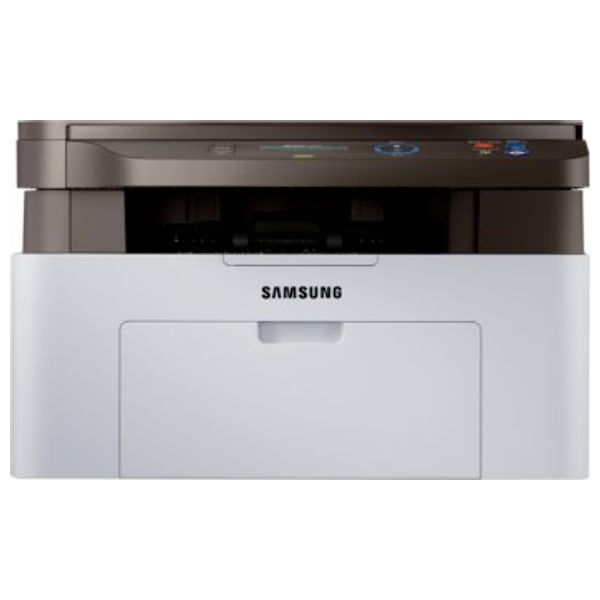
Product specifications
Functions
Print, copy, scan
Multitasking supported
Yes
Number of print cartridges
1 (black)
Recommended monthly page volume
100 to 1,500
Print technology
Laser
Print quality black (best)
Black: Up to 1,200 x 1,200 dpi Color:
Print languages
SPL
Display
2-line LCD (16 characters per line)
Processor speed
600 MHz
Automatic paper sensor
No
HP ePrint capability
No
Mobile printing capability
No
Wireless capability
No
Connectivity, standard
Hi-Speed USB 2.0
Network ready
None
Minimum system requirements
Windows® XP (SP3) (32-bit)or newer, 933 MHz processer or higher, 128 MB RAM, 1.5 GB HD space, CD-ROM or Internet, USB or Network connection OSX 10.5 or newer; Internet; USB or Network connection; 1 GB HD space; 1 GB RAM
Compatible operating systems
Windows®: XP (32/64 bit), 2003 Server (32/64 bit), Vista (32/64 bit), 2008 server (32/64 bit), 7 (32/64 bit), 2008 Server R2, 10 (32/64 bit), 2012 Server, 2016 Server; MAC OS 10.5 - 10.11; Linux: Red Hat Enterprise Linux (5, 6, 7), Fedora (13, 14, 15, 16, 17, 18, 19, 20, 21, 22), openSUSE (11.3, 11.4, 12.1, 12.2, 12.3, 13.1, 13.2), Ubuntu (10.04, 10.10, 11.04, 11.10, 12.04, 12.10, 13.04, 13.10, 14.04, 14.10, 15.04), SUSE Linux Enterprise Desktop (11, 12), Debian (6, 7, 8), Mint (13, 14, 15, 16, 17); Unix: Sun Solaris 9, 10, 11 (x86, SPARC), HP-UX 11.0, 11i v1, 11i v2, 11i v3 (PA-RISC, Itanium), IBM AIX 5.1, 5.2, 5.3, 5.4, 6.1, 7.1 (PowerPC)
Memory
128 MB
Memory, maximum
128 MB
Paper handling input, standard
150-sheet input tray
Paper handling output, standard
100-sheet output bin
Maximum output capacity (sheets)
Up to 100 sheets
Duplex printing
Manual (driver support provided)
Media types
Plain, Thick, Thin, Cotton, Color, Preprinted, Recycled, Lables, CardStock, Bond, Archive, Envelope
Scanner type
Flatbed
Scan file format
PDF, JPG, TIFF
Scan resolution, optical
Up to 1,200 dpi
Digital sending standard features
Scan to WSD, WSD Scan, PC Scan
Scan input modes
Front-panel copy, Samsung Scan software; user application via TWAIN or WIA
Copy resolution (black text)
Up to 600 x 600 dpi
Copy reduce / enlarge settings
25 to 400%
Copies, maximum
Up to 999 copies
Power
110-volt input voltage: 110 to 127 VAC, 50/60Hz and 220-volt input voltage: 220 to 240 VAC, 50/60Hz
Power consumption
310 watts (Printing), 2.1 watts (Power Save), 30 watts (Ready)
Recommended operating humidity range
20 to 70% RH (non-condensing)
Acoustic power emissions (ready)
3.9 B (A)
Acoustic pressure emissions bystander (active, printing)
50 dB (A)
Software included
Samsung Common Installer, Total Uninstaller, SPL print driver, TWAIN/WIA driver, PC Fax Utility, Easy Printer Manager, Easy Document Creator, Scan OCR program, Printer Diagnostics, Printer Center, View User's Guide, Lite SM
162,000 IQD


Product Information
Product specifications
Functions
Print, copy, scan
Multitasking supported
Yes
Number of print cartridges
1 (black)
Recommended monthly page volume
100 to 1,500
Print technology
Laser
Print quality black (best)
Black: Up to 1,200 x 1,200 dpi Color:
Print languages
SPL
Display
2-line LCD (16 characters per line)
Processor speed
600 MHz
Automatic paper sensor
No
HP ePrint capability
No
Mobile printing capability
No
Wireless capability
No
Connectivity, standard
Hi-Speed USB 2.0
Network ready
None
Minimum system requirements
Windows® XP (SP3) (32-bit)or newer, 933 MHz processer or higher, 128 MB RAM, 1.5 GB HD space, CD-ROM or Internet, USB or Network connection OSX 10.5 or newer; Internet; USB or Network connection; 1 GB HD space; 1 GB RAM
Compatible operating systems
Windows®: XP (32/64 bit), 2003 Server (32/64 bit), Vista (32/64 bit), 2008 server (32/64 bit), 7 (32/64 bit), 2008 Server R2, 10 (32/64 bit), 2012 Server, 2016 Server; MAC OS 10.5 - 10.11; Linux: Red Hat Enterprise Linux (5, 6, 7), Fedora (13, 14, 15, 16, 17, 18, 19, 20, 21, 22), openSUSE (11.3, 11.4, 12.1, 12.2, 12.3, 13.1, 13.2), Ubuntu (10.04, 10.10, 11.04, 11.10, 12.04, 12.10, 13.04, 13.10, 14.04, 14.10, 15.04), SUSE Linux Enterprise Desktop (11, 12), Debian (6, 7, 8), Mint (13, 14, 15, 16, 17); Unix: Sun Solaris 9, 10, 11 (x86, SPARC), HP-UX 11.0, 11i v1, 11i v2, 11i v3 (PA-RISC, Itanium), IBM AIX 5.1, 5.2, 5.3, 5.4, 6.1, 7.1 (PowerPC)
Memory
128 MB
Memory, maximum
128 MB
Paper handling input, standard
150-sheet input tray
Paper handling output, standard
100-sheet output bin
Maximum output capacity (sheets)
Up to 100 sheets
Duplex printing
Manual (driver support provided)
Media types
Plain, Thick, Thin, Cotton, Color, Preprinted, Recycled, Lables, CardStock, Bond, Archive, Envelope
Scanner type
Flatbed
Scan file format
PDF, JPG, TIFF
Scan resolution, optical
Up to 1,200 dpi
Digital sending standard features
Scan to WSD, WSD Scan, PC Scan
Scan input modes
Front-panel copy, Samsung Scan software; user application via TWAIN or WIA
Copy resolution (black text)
Up to 600 x 600 dpi
Copy reduce / enlarge settings
25 to 400%
Copies, maximum
Up to 999 copies
Power
110-volt input voltage: 110 to 127 VAC, 50/60Hz and 220-volt input voltage: 220 to 240 VAC, 50/60Hz
Power consumption
310 watts (Printing), 2.1 watts (Power Save), 30 watts (Ready)
Recommended operating humidity range
20 to 70% RH (non-condensing)
Acoustic power emissions (ready)
3.9 B (A)
Acoustic pressure emissions bystander (active, printing)
50 dB (A)
Software included
Samsung Common Installer, Total Uninstaller, SPL print driver, TWAIN/WIA driver, PC Fax Utility, Easy Printer Manager, Easy Document Creator, Scan OCR program, Printer Diagnostics, Printer Center, View User's Guide, Lite SM
| Printer Type: | Laser Printer |
| Print Type: | Black&White |
| Print Resolution: | 600x600 dbi |
| Maximum Paper Input: | 100 paper |
| Copy: | Yes |
| Color: | White |
More details
See something wrong?
Report incorrect product information and get reward points.

Warranty
3 months provided by Taqa Group
Customer Q&A
Reviews 5 4 3 2 1
50
40
30
20
10
Share your thoughts with other customers
Write a review